
I remember standing in a cramped, high-ceilinged hallway during a corporate shoot last year, watching a junior photographer scramble to swap out his prime lens for a massive, expensive tilt-shift. He was convinced that the only way to solve the problem was through high-end glass, but honestly, he was just fighting a losing battle against a room that was never meant to be photographed. Most tutorials will tell you that you need specialized gear or complex mathematical corrections, but they skip the reality of how to fix converging verticals when you’re actually on location with a client breathing down your neck. It’s rarely about the lens; it’s about the floor, the tripod height, and the fact that some architecture simply refuses to play nice.
In this notebook, I’m not going to give you a lecture on geometry or sell you on a thousand-dollar piece of equipment. Instead, I’m going to show you how I handle these distortions using the gear I already have in my bag and the practical compromises I make in the field. We’ll talk about where to stand, how to position your tripod, and when to just accept a little bit of lean to save the composition.
The Leaning Building Why Its Not Your Cameras Fault
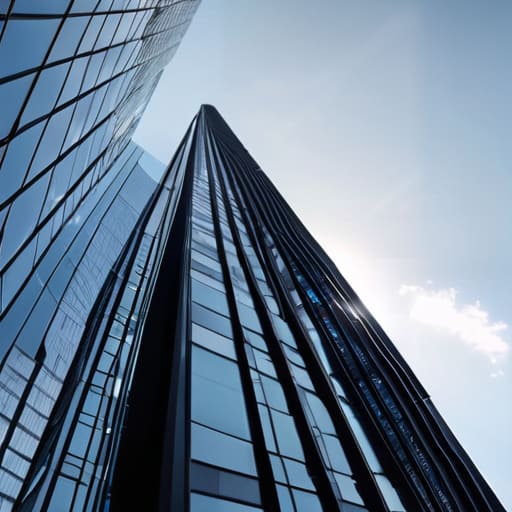
Look, I’ve seen it a hundred times: a photographer staring at their LCD screen with a look of genuine betrayal because the skyscraper in front of them looks like it’s about to topple over into the street. They start checking their settings, wondering if their sensor is misaligned or if they’ve bought a faulty lens. But here’s the truth: that keystone effect in photography isn’t a technical failure. It’s just geometry being a jerk. When you tilt your camera up to catch the top of a building, you are fundamentally changing how those parallel lines meet your sensor. You aren’t broken; you’re just pointing at something that doesn’t want to be captured from below.
I used to think I needed a specialized tilt-shift lens for every single job to avoid this, but that’s an expensive way to solve a problem that is mostly about physics. Most of the time, you’re just fighting the limitations of a standard focal length in a cramped space. Instead of panicking about lens distortion in building shots, start looking at your feet. If you can move back, or find a way to level the tripod, you’ve already won half the battle. If you can’t, well, that’s just the room winning this round.
Understanding the Keystone Effect in Photography

Look, we can call it “perspective distortion” if we want to sound professional, but in the studio or out on a street corner, it’s just the keystone effect in photography making everything look like it’s falling over. It happens because you’re standing at the base of something tall, pointing your lens upward, and the sensor is capturing a wedge of space rather than a rectangle. The top of the building is physically further away from your lens than the bottom, so the lines naturally taper. It’s not a mistake in your technique; it’s just geometry being a nuisance.
I spent years watching senior photographers scramble to fix this in Lightroom, but the real trick is understanding that lens distortion in building shots is often a secondary headache compared to the actual tilt of the camera. You can have the most expensive glass in the world, but if you’re aiming up at a skyscraper, those lines are going to want to converge. It’s a fundamental part of how we translate a 3D world onto a flat plane, and once you stop fighting the physics and start planning for it, you’ll save yourself a lot of frustration during the edit.
Fighting Lens Distortion in Building Shots

If you aren’t using a tilt-shift lens, you’re essentially playing a game of damage control. I know, I know—tilt-shifts are expensive, heavy, and a nightmare to carry through a city, but they are the only real way to solve the problem at the source. By shifting the lens plane rather than tilting the camera body, you keep your sensor parallel to the subject. This prevents that dreaded keystone effect in photography from happening in the first place, saving you from the digital “stretch” that happens when you try to fix everything later.
However, most of us are working with standard primes or zooms, which means we have to deal with lens distortion in building shots head-on. When you’re forced to tilt the camera up to catch a skyscraper, you’re inviting those lines to dive toward the center. My rule of thumb? Stay as level as possible. If you can’t get the shot without tilting, you’ll spend twice as much time in Lightroom fighting the software’s attempt to reconstruct the geometry. It’s a compromise, but sometimes you just have to accept that the math of the lens is working against you.
The Magic and Math of Tilt Shift Lens Usage
Look, I know the gear nerds will tell you that a tilt-shift lens is the only “correct” way to handle this, and technically, they aren’t wrong. If you’re doing serious architectural photography perspective correction, having that ability to shift the lens plane up or down without tilting the camera body is a godsend. It allows you to keep your sensor parallel to the building’s facade, which effectively kills the keystone effect in photography before you even press the shutter. It’s clean, it’s precise, and it keeps your lines from looking like they’re melting toward the sky.
But let’s be real about the practical side of tilt-shift lens usage. These lenses are heavy, they are expensive, and they require a very specific, almost clinical way of working. You can’t just wing it. You have to be hyper-aware of your focal length and how much shift you’re actually applying to avoid weird edge distortions. For most of my commissions, I find that while the math behind the shift is perfect, the physicality of managing the gear in a cramped or windy location is where the real struggle begins.
How to Fix Converging Verticals Without Losing the Soul
Look, you can spend an hour in Lightroom trying to pull those lines back into place, but there is a cost. When you rely entirely on straightening vertical lines in post-processing, you’re essentially performing surgery on your composition. You’ll get your verticals straight, sure, but you’ll also lose the edges of your frame, crop out that interesting bit of texture on the pavement, or end up with a weird, stretched-out feeling in the corners that makes the whole building look like it’s made of rubber.
The trick is to stop treating perspective correction as a digital band-aid and start treating it as a compositional choice. If you know you’re going to have to fight a heavy keystone effect in photography, don’t frame the shot so tight that you have no room to breathe. Give yourself some “dead space” around the edges. It feels counterintuitive to leave empty space in a shot, but that extra margin is your insurance policy. It allows you to tilt the frame or crop aggressively later without sacrificing the structural integrity of the image. You aren’t just fixing a mistake; you’re building in a buffer for the inevitable.
Straightening Vertical Lines in Post Processing Realities
When you finally sit down in front of Lightroom or Capture One, the temptation is to just grab the Transform tool and yank everything into place. It’s tempting, I know. But if you overdo it, you’ll end up with a crop so aggressive that your composition looks like it was sliced by a dull knife. Straightening vertical lines in post-processing isn’t just about making things upright; it’s about managing the collateral damage. Every time you pull those lines back, you’re losing the corners of your frame, and if you’ve shot wide, you’re going to see some nasty stretching in the edges that no amount of sharpening can fix.
The trick is to be surgical. Instead of relying on the “Auto” button—which usually has no concept of your actual intent—use the guided sliders to nudge the geometry. I always try to find a balance between a perfect architectural perspective and a shot that still feels like it was taken by a human being standing on a sidewalk. If you find yourself fighting massive perspective distortion solutions just to get a building to stand straight, you probably should have stepped back ten feet before you even hit the shutter.
Five ways to stop fighting the geometry and start working with it
- Get low or stay back. If you’re shooting an upward angle to catch the top of a building, you’re almost guaranteed to get those leaning lines. If the client allows it, move back and use a longer focal length. It’s much easier to crop a wide shot later than it is to fix a perspective that’s been completely mangled by a steep upward tilt.
- Use a tripod with a spirit level, not just your eyes. I’ve seen so many shoots ruined because the photographer “felt” level, but the sensor was actually tilted three degrees to the left. If you can keep your camera plane perfectly parallel to the subject, the verticals stay vertical. It’s tedious, but it saves you an hour of wrestling with Lightroom later.
- Watch your edges. When you realize you need to straighten a shot in post, you’re going to lose the corners of your frame to the crop. Before you even click the shutter, look at where the building meets the sky or the sidewalk. If you’re too close to the edge, the “fix” will leave you with a composition that feels suffocatingly tight.
- Mind the floor. If you’re shooting a corporate team in a room with weird proportions, don’t just focus on the walls. If the floor tiles are leading the eye into a distorted vanishing point, it’ll pull the whole image down. Sometimes, adjusting your height by just six inches changes how the floor meets the wall, which can save the entire perspective.
- Embrace the tilt-shift, but don’t rely on it as a crutch. A tilt-shift lens is a dream for architecture, but it’s a heavy, expensive tool. If you find yourself needing one for every single shoot, you haven’t learned how to read the room yet. Learn to use your feet and your tripod first; use the glass when the physics of the building truly won’t let you do anything else.
The Post-Processing Trap
You can spend hours dragging sliders in Lightroom to pull those buildings back into alignment, but every time you stretch a pixel to fix a bad angle, you’re just trading a geometric error for a loss of resolution. If you can, move your feet or drop your tripod; don’t ask the software to do the work your setup should have handled in the first place.
Iwona Krawczyk
The Reality Check
Look, at the end of the day, you’ve got a toolkit that ranges from the high-end math of a tilt-shift lens to the desperate, last-resort crops in Lightroom. We’ve covered the physics of why those walls look like they’re falling inward, the way your focal length can either help or betray you, and the inevitable reality that post-processing is often just damage control. Whether you’re fighting a wide-angle distortion or a room that simply wasn’t designed for a level sensor, remember that you can always fix a line, but you can’t always fix a missed moment. Don’t spend so much time obsessing over a two-degree tilt that you forget to actually look at the light.
If there is one thing I learned during my eight years assisting, it’s that perfection is a moving target. You can spend an hour chasing perfectly parallel verticals until your eyes ache, but if the shot has no soul, no tension, and no story, the straightest lines in the world won’t save it. Sometimes, a slight lean conveys the scale of a towering structure better than a sterile, corrected frame ever could. Use the tools to fix the mistakes, but don’t let the technicalities strangle the life out of your perspective. Sometimes the best way to handle a difficult room is to stop fighting it and just find the angle that works.
