
I once spent three hours on a single author portrait, obsessively smoothing out a chin line and erasing every fine wrinkle, only to realize I’d turned a brilliant, weathered face into a piece of expensive-looking plastic. I sat there in the blue light of my monitor, staring at a person who no longer existed, wondering exactly how to decide how much to retouch without losing the very soul that made the commission worth taking in the first place. We are taught that retouching is about perfection, but after years of seeing how much a person’s character is tied to their “imperfections,” I’ve realized that over-editing is just a polite way of lying.
This isn’t a tutorial on which sliders to move in Photoshop or how to use the latest AI skin-smoothing plugin. Instead, I want to talk about the judgment call—the messy, subjective space between fixing a genuine distraction and erasing a human being. I’m going to share the mental checklist I use to determine where the technical correction ends and the character begins, so you can stop guessing and start making decisions that actually respect your subject.
Understanding How to Decide How Much to Retouch
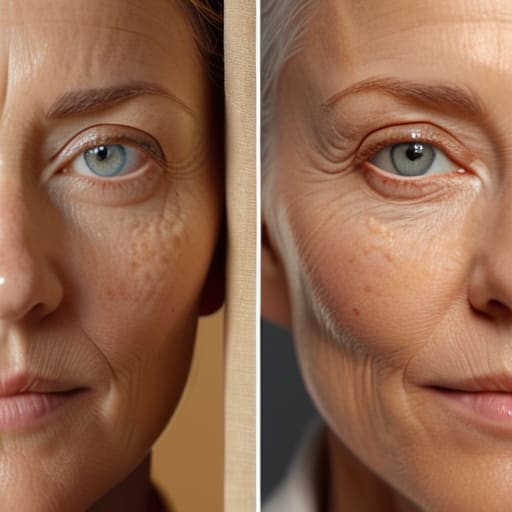
The first thing you have to do is figure out what kind of lie you’re telling. If I’m shooting a corporate headshot for a CEO, they want to look like the most rested, capable version of themselves, but they don’t want to look like a CGI character. If I’m doing an editorial piece for a novelist, they might actually want those deep expression lines; those lines are their history. You have to establish the line between authentic vs enhanced imagery before you even open Lightroom. If you don’t, you’ll spend three hours chasing a version of “perfection” that doesn’t actually exist in the real world.
This is where managing client expectations becomes more important than your technical skill. I always tell my clients that I can fix a stray hair or a temporary blemish, but I won’t reconstruct their entire face. You have to be honest about the post-processing limits of the session. If the lighting was flat and the skin looks muddy, don’t try to paint life back into it with a brush; that’s when you end up crossing the line from professional polish into something that feels fundamentally dishonest.
Key Things to Know
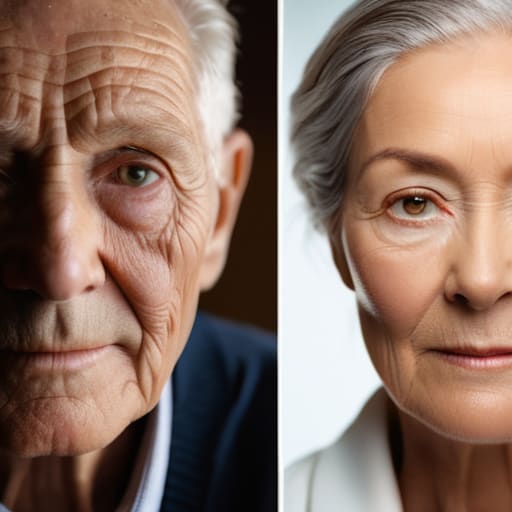
First, you have to look at the contract, or more realistically, the conversation you had in the car on the way to the shoot. If you’re shooting a corporate headshot for a lawyer, they want to look like the most capable version of themselves, not a filtered teenager. If it’s an author portrait, they might want the lines around their eyes because those lines are where the story is. Managing client expectations isn’t just about being polite; it’s about knowing whether you’re delivering a polished brand asset or a piece of authentic vs enhanced imagery before you even touch the mouse.
Then there’s the technical line you shouldn’t cross. I’ve seen too many photographers try to “fix” a face by erasing every pore, and it always ends up looking like plastic. You have to prioritize natural skin texture preservation; if the skin looks like a smooth pebble, you’ve failed. There is a massive difference between removing a temporary blemish and restructuring a person’s bone structure. Once you start changing the actual architecture of a face, you’ve moved past editing and into a territory that feels less like photography and more like a lie.
Practical Tips and Steps

Start by looking at the person in the frame, not the pixels. If you’re shooting an author portrait, they need to look like the person who will show up to the book signing, not a porcelain doll. My rule of thumb is to focus on removing temporary distractions—a stray hair, a mid-sentence blemish, or a bit of lint—rather than re-sculpting their face. This is where natural skin texture preservation becomes your best friend; if you lose the pores, you lose the person, and suddenly you’re looking at a CGI character instead of a human being.
Before you even touch a slider, you have to be clear on the contract. I’ve learned the hard way that managing client expectations during the booking phase saves you hours of arguing over a chin line later. If they want “magazine perfection,” tell them what that actually costs in terms of time and whether it aligns with your personal brand. Setting those post-processing limits early means you aren’t caught in a loop of endless revisions because a client didn’t realize that “natural” and “flawless” are often two very different things.
Common Mistakes to Avoid
The biggest trap I see—and I’ve fallen into it myself during late-night sessions—is treating retouching like a magic eraser for poor lighting. If you’re spending three hours trying to smooth out a shadow that should have been fixed with a reflector, you’re not editing; you’re compensating. This leads to that uncanny, plastic look where you lose all natural skin texture preservation. Once the pores vanish, the soul of the portrait goes with them. If the skin looks like it was rendered in a lab, you’ve crossed the line from fixing a blemish to creating a stranger.
Another mistake is failing at the very beginning: managing client expectations. I’ve had clients ask for “a little bit of work” and then act shocked when they don’t look like a filtered Instagram influencer. You have to define the boundary between authentic vs enhanced imagery before you even pick up the stylus. Don’t let the session turn into a negotiation mid-edit. Decide early whether you are documenting a person or constructing an ideal, because trying to do both usually results in a lie that nobody actually wants to buy.
Final Thoughts
At the end of the day, my rule of thumb is to look at the person in the frame and ask if they’d still recognize themselves in the mirror. If you’ve polished away every pore and shadow, you haven’t just fixed a blemish; you’ve deleted their character. I’ve spent too many hours staring at a screen to realize that natural skin texture preservation is actually the hardest part of the job, but it’s what separates a portrait from a plastic rendering.
It’s a constant tug-of-war between authentic vs enhanced imagery, and honestly, the line moves every single time. You have to be comfortable with the fact that you can’t fix everything in post-processing. Some things are better left to the light you caught in the room or a quick adjustment of the hair before they walk out the door. Ultimately, managing client expectations during the booking phase is your best defense against the “make me look perfect” trap. If you set the boundaries early, you won’t find yourself lost in an endless loop of digital manipulation trying to chase a version of reality that doesn’t actually exist.
Five ways to tell if you’ve gone too far
- Look at the skin texture, not just the color. If you’ve smoothed out the pores to the point where the subject looks like they’ve been dipped in candle wax, you’ve lost them. I always tell my assistants: if you can’t see the grain of the skin, you’ve stopped retouching and started erasing.
- Check the eyes against the original RAW file. It’s easy to accidentally brighten the iris or sharpen the catchlight so much that the person looks startled or, worse, robotic. If the “sparkle” looks like a digital sticker, back off the opacity.
- Stop looking at the image on a high-end calibrated monitor for a second and look at it on your phone. If they look like a different human being on a standard screen, you’ve crossed the line from “polishing” to “reconstructing.”
- Use the “blink test.” Zoom in, do a heavy edit, and then zoom out and blink rapidly. If the first thing your brain registers is the edit rather than the person’s expression, you’ve let the technical work overshadow the portrait.
- Match the retouching to the brief, not your own perfectionism. If I’m shooting a corporate headshot for a CEO, they want to look rested, not like they’ve had a facelift. If the client asked for “natural,” don’t give them “uncanny valley” just because you spent three hours on a frequency separation layer.
The Line Between Polish and Plastic
There’s a point in every edit where you stop fixing a distraction and start erasing a person; my rule is to fix the lighting mistake, but never to fix the fact that they have character.
Iwona Krawczyk
The Final Call
At the end of the day, deciding where to stop retouching is a constant tug-of-war between technical perfection and the truth of the person in front of your lens. You’ve looked at the lighting, you’ve checked the skin texture, and you’ve weighed the client’s brief against the reality of what you actually captured. Remember that your job isn’t to erase the subject, but to manage the distractions so their character can actually breathe. If you find yourself spending three hours trying to fix a shadow that was actually a result of a poorly placed reflector, you’ve lost the plot. The goal is to reach that sweet spot where the image looks like the best version of the moment, rather than a digital reconstruction of a person who doesn’t exist.
If you’re still staring at the screen, feeling like you’re one slider away from greatness, do yourself a favor: walk away. Go make a coffee, look at a piece of film you developed last week, or just stare out the window. When you come back, you’ll see immediately if you’re polishing the soul out of the portrait or if you’ve actually finished the work. Trust your gut more than your tools. Ultimately, the most powerful images aren’t the ones with the cleanest skin, but the ones that feel human. Don’t let the pursuit of a perfect pixel rob you of the emotional truth that made you pick up a camera in the first place.
